Friday, 6 November 2015

Kenyans and Zimbabweans come for each other on twitter


Kenyans and Zimbabweans had a twitter fight two days go after a Kenyan news outlet, The Spectator, published a false article saying that Zimbabwean President Robert Mugabe made a defamatory comment about Kenyans. The report has now been discredited. Spectator quoted Mugabe as saying "Those people of East Africa shock me with their wizardry in stealing. Sometimes I tend to believe that stealing is in every Kenyan's blood….You can even think that there is a subject in their universities called Bachelor of Stealing". Kenyans didn't find the comment funny and came for Zimbabweans on Twitter. It's hilarious...

Real Madrid F.C release statement supporting Karim Benzema in sex tape extortion case


Real Madrid striker Karim Benzema received the backing of his club on Thursday, just hours after being charged in connection with a sex tape extortion case. The 27-year-old was released by French prosecutors on Thursday after a blackmail case involving a sex tape featuring fellow French international Mathieu Valbuena was brought to the fore. Despite the player pictured training alone, Real Madrid's president leapt to the defence of the French international. "Real Madrid president, Florentino Perez, held a meeting with the player in which he gave him his full support and expressed his confidence that his actions were in good faith and that he is completely innocent," said a statement released by the Spanish giants. "The club values and recognises the professional commitment, the displays of camaraderie with his team-mates and the impeccable attitude he has shown as a core member of the first team squad for the more than six seasons that he has been a part of Real Madrid." Real Madrid said that Benzema, who is still recovering from injury, had trained on his own, jogged and carried out various exercises. A source in the French criminal investigation said Benzema had admitted approaching Valbuena about the sex tape "on behalf of a childhood friend" who himself had been contacted by blackmailers in possession of the tape, who were seeking to extort money. But Benzema's lawyer said his client was "innocent"..

Ooni Adeyeye Ogunwusi Lagos Resort (PHOTOS)


Pictures from different parts of the expensive King's Beach Resorts. THE destination was Inagbe Grand Beach Resort on one of the islands that dot the Lagos lagoon waterway heading to Badagry. The take-off point was the jetty along Queens Drive, Ikoyi where a luxury boat latched to the jetty bobbed to the rise and fall of the waves on the lagoon. Each member of the team made his or her way to the boat, collected a life jacket and gingerly stepped into the boat. The leather settee felt comfortable. The boat paraded a 1, 000 horse power twin outboard engine. The last person to come on board was a tall, young man in navy blue shirt and white chinos trousers. He had stayed back to ensure that everyone was comfortably accommodated. He boarded the vessel and glanced round to make sure everybody was comfortable and safe. Then he ordered the boat operator to launch the trip. In the course of the comfortable 15-minute cruise to the resort, some of us got to know that the person that courteously supervised the boarding was the resort’s owner, then Prince Adeyeye Ogunwusi. Today, he is the Ooni of Ife. At Inagbe Grand Beach Resort, right from the wooden walkway that extended deep onto the lagoon with the floating lounge on the water, everything about the resort was classy and special. It was also obvious that a broad-minded person who understood tourism conceptualized the resort.

Resign Now – PDP Tells Buhari


President Muhammadu Buhari has been urged to resign as commander-in-chief of the federation by the Peoples Democratic Party (PDP) over his inability to stir the nation towards economic success.The party on Thursday, November 5 said Buhari does not deserve to remain president for admitting that the nation is broke.

PMB Will Surprise Nigerians - Cherubim And Seraphim Pastor


Most Reverend Samuel Abidoye, the Spiritual Head of Cherubim and Seraphim Movement, worldwide has predicted what President Muhammadu Buhari will do in 2016. According to him, Buhari will surprise Nigerians with his incredible performance in 2016, Vanguard reports. Speaking yesterday, November 5, in Galilee land along Ogbomosho-Ilorin expressway ‎while declaring open the 75th Annual Conference of the church, the cleric urged Nigerians to be patient with the president as he needs to clear the rot from previous administration before he can bring about the desired change he promised. He said: “Nigerians should expect incredibly good performance from President Buhari in 2016. People will be surprised by the progress he will make so, Nigerians should be very patient with him now. People should always remember that he had been there before so, he knows what to do at the right time to make the desired change he promised” “The past administrations which ‎hurried in their governments, we knew where they left us so this time around, I plead with Nigerians to be very patient with Buhari. He will need to clear these mess before he can do anything tangible; he has not spent up to a year so we should be patient and stop criticising him.” READ ALSO: What God Told Me Before The Elections – Father Mbaka On the issue of insurgency, the cleric said Nigeria can only be saved by divine intervention. According to him, Nigeria is still standing strong because the people have not stopped praying and it was the prayer that has kept the nation. He therefore, called on all Nigerians, religious leaders and groups to come together and hold special prayers for peace to return to the country. Some weeks back, Pastor Williams Kumuyi, the general superintendent of the Deeper Christian Life Ministry had commended Buhari for his fight against corruption saying: “I am a layman when it comes to politics. But from what we can see, I believe that the president is in the right direction and if we support him with our comments and in other ways, I believe that we will see corruption brought down very quickly.”

Thursday, 5 November 2015

See These Cute Photos of Ex-President Goodluck Jonathan's Grand Daughter


Former President Jonathan’s adopted daughter, Faith Sakwe and her husband Godswill Edward welcomed a daughter, Eliana in September 23 in the USA Faith shared a collage of photos of her adorable little princess…

Rick Ross Gets His $350k Engagement Ring Back After Breakup with Lira Galore


After breaking his engagement with Lira Galore on Sunday, Rick Ross is said to have gotten his expensive engagement ring back from his ex-fiancee. On Monday, Lira posted a photo of herself still wearing the 11 carat $350k ring, a day after they broke up, igniting rumours that Rick must have left the ring for her. It was later cleared to be an old photo, as Rick has the ring firmly in his possession. TMZ tells is they broke off the engagement at Rick's home and when Lira left she was not wearing the ring. We do not know the circumstances under which the ring left her finger for his hand. In Georgia, an engagement ring is a "gift in contemplation of marriage", meaning if the couple doesn't get married, the guy gets it back.

Cristiano Ronaldo's Mother Reveals She Considered Aborting Him -


Cristiano Ronaldo’s mother has admitted she considered having an abortion when she was pregnant with him, in the new documentary film 'Ronaldo', which charts the Real Madrid star’s rise from humble beginnings to the summit of world football. Ronaldo’s mother, Maria Dolores dos Santos Aveiro, opened up in the film, explaining how she thought about having a termination when she found out she was expecting the global superstar. In the film, Maria says: “He was a child I wanted to abort. We laugh about it now and he says ‘now I am helping you all’.” From the makers of the acclaimed Senna documentary about the life of the late Formula One legend Ayrton Senna, the film follows a year in the life of Ronaldo.

Wednesday, 4 November 2015

ABOUT US

Flashnigeria.com is a Nigerian online news site that covers all round news, politics, business, sports, entertainment, and many others.
flashnigeria is also a platform for Nigerians, to reclaim our identity & our heritage. We pledge a huge commitment to offer our country the type of media that will advocate for the people and nudge our motherland to the path of development.
flashnigeria  is accessible via this site (flashnigeria.com) and mobile phone apps.
Based in Nigeria flashnigeria.com was founded on january 2016 by Nigerian Blogger ARNOLD NJOKU.
We are always looking for new contributors, so if you feel strongly about the Nigerian identity in our globalised world, Nigeria’s engagement with the rest of the world, and the way any African event is reported by the international media, or simply have original ideas you’d like to share, write to us info@flashnigeria.com

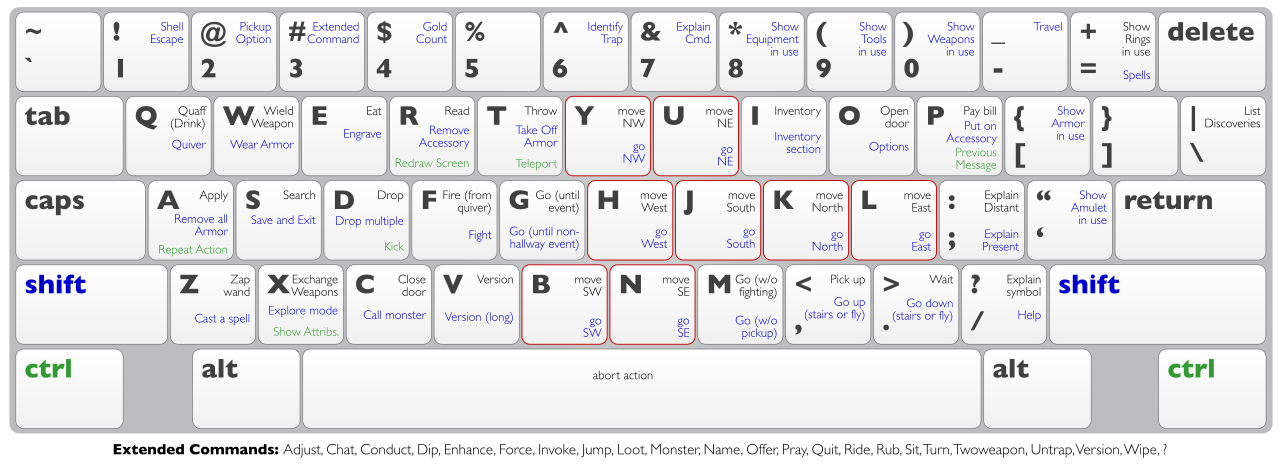
Over 100 Computer Keyboard Shortcuts!!!

this post is not only for beginners but also for some computer literate fellows who are not used to this short cuts

Keyboard Shortcuts (Microsoft Windows)


1. CTRL+C (Copy)
2. CTRL+X (Cut)
... 3. CTRL+V (Paste)
4. CTRL+Z (Undo)
5. DELETE (Delete)
6. SHIFT+DELETE (Delete the selected item permanently without placing the item in the Recycle Bin)
7. CTRL while dragging an item (Copy the selected item)
8. CTRL+SHIFT while dragging an item (Create a shortcut to the selected item)
9. F2 key (Rename the selected item)
10. CTRL+RIGHT ARROW (Move the insertion point to the beginning of the next word)
11. CTRL+LEFT ARROW (Move the insertion point to the beginning of the previous word)
12. CTRL+DOWN ARROW (Move the insertion point to the beginning of the next paragraph)
13. CTRL+UP ARROW (Move the insertion point to the beginning of the previous paragraph)
14. CTRL+SHIFT with any of the arrow keys (Highlight a block of text)
SHIFT with any of the arrow keys (Select more than one item in a window or on the desktop, or select text in a document)
15. CTRL+A (Select all)
16. F3 key (Search for a file or a folder)
17. ALT+ENTER (View the properties for the selected item)
18. ALT+F4 (Close the active item, or quit the active program)
19. ALT+ENTER (Display the properties of the selected object)
20. ALT+SPACEBAR (Open the shortcut menu for the active window)
21. CTRL+F4 (Close the active document in programs that enable you to have multiple documents opensimultaneously)
22. ALT+TAB (Switch between the open items)
23. ALT+ESC (Cycle through items in the order that they had been opened)
24. F6 key (Cycle through the screen elements in a window or on the desktop)
25. F4 key (Display the Address bar list in My Computer or Windows Explorer)
26. SHIFT+F10 (Display the shortcut menu for the selected item)
27. ALT+SPACEBAR (Display the System menu for the active window)
28. CTRL+ESC (Display the Start menu)
29. ALT+Underlined letter in a menu name (Display the corresponding menu) Underlined letter in a command name on an open menu (Perform the corresponding command)
30. F10 key (Activate the menu bar in the active program)
31. RIGHT ARROW (Open the next menu to the right, or open a submenu)
32. LEFT ARROW (Open the next menu to the left, or close a submenu)
33. F5 key (Update the active window)
34. BACKSPACE (View the folder onelevel up in My Computer or Windows Explorer)
35. ESC (Cancel the current task)
36. SHIFT when you insert a CD-ROM into the CD-ROM drive (Prevent the CD-ROM from automatically playing)

Dialog Box - Keyboard Shortcuts

1. CTRL+TAB (Move forward through the tabs)
2. CTRL+SHIFT+TAB (Move backward through the tabs)
3. TAB (Move forward through the options)
4. SHIFT+TAB (Move backward through the options)
5. ALT+Underlined letter (Perform the corresponding command or select the corresponding option)
6. ENTER (Perform the command for the active option or button)
7. SPACEBAR (Select or clear the check box if the active option is a check box)
8. Arrow keys (Select a button if the active option is a group of option buttons)
9. F1 key (Display Help)
10. F4 key (Display the items in the active list)
11. BACKSPACE (Open a folder one level up if a folder is selected in the Save As or Open dialog box)

Microsoft Natural Keyboard Shortcuts
1. Windows Logo (Display or hide the Start menu)
2. Windows Logo+BREAK (Display the System Properties dialog box)
3. Windows Logo+D (Display the desktop)
4. Windows Logo+M (Minimize all of the windows)
5. Windows Logo+SHIFT+M (Restorethe minimized windows)
6. Windows Logo+E (Open My Computer)
7. Windows Logo+F (Search for a file or a folder)
8. CTRL+Windows Logo+F (Search for computers)
9. Windows Logo+F1 (Display Windows Help)
10. Windows Logo+ L (Lock the keyboard)
11. Windows Logo+R (Open the Run dialog box)
12. Windows Logo+U (Open Utility Manager)
13. Accessibility Keyboard Shortcuts
14. Right SHIFT for eight seconds (Switch FilterKeys either on or off)
15. Left ALT+left SHIFT+PRINT SCREEN (Switch High Contrast either on or off)
16. Left ALT+left SHIFT+NUM LOCK (Switch the MouseKeys either on or off)
17. SHIFT five times (Switch the StickyKeys either on or off)
18. NUM LOCK for five seconds (Switch the ToggleKeys either on or off)
19. Windows Logo +U (Open Utility Manager)
20. Windows Explorer Keyboard Shortcuts
21. END (Display the bottom of the active window)
22. HOME (Display the top of the active window)
23. NUM LOCK+Asterisk sign (*) (Display all of the subfolders that are under the selected folder)
24. NUM LOCK+Plus sign (+) (Display the contents of the selected folder)

MMC Console keyboard shortcuts

1. SHIFT+F10 (Display the Action shortcut menu for the selected item)
2. F1 key (Open the Help topic, if any, for the selected item)
3. F5 key (Update the content of all console windows)
4. CTRL+F10 (Maximize the active console window)
5. CTRL+F5 (Restore the active console window)
6. ALT+ENTER (Display the Properties dialog box, if any, for theselected item)
7. F2 key (Rename the selected item)
8. CTRL+F4 (Close the active console window. When a console has only one console window, this shortcut closes the console)

Remote Desktop Connection Navigation
1. CTRL+ALT+END (Open the Microsoft Windows NT Security dialog box)
2. ALT+PAGE UP (Switch between programs from left to right)
3. ALT+PAGE DOWN (Switch between programs from right to left)
4. ALT+INSERT (Cycle through the programs in most recently used order)
5. ALT+HOME (Display the Start menu)
6. CTRL+ALT+BREAK (Switch the client computer between a window and a full screen)
7. ALT+DELETE (Display the Windows menu)
8. CTRL+ALT+Minus sign (-) (Place a snapshot of the active window in the client on the Terminal server clipboard and provide the same functionality as pressing PRINT SCREEN on a local computer.)
9. CTRL+ALT+Plus sign (+) (Place asnapshot of the entire client window area on the Terminal server clipboardand provide the same functionality aspressing ALT+PRINT SCREEN on a local computer.)

Microsoft Internet Explorer Keyboard Shortcuts

1. CTRL+B (Open the Organize Favorites dialog box)
2. CTRL+E (Open the Search bar)
3. CTRL+F (Start the Find utility)
4. CTRL+H (Open the History bar)
5. CTRL+I (Open the Favorites bar)
6. CTRL+L (Open the Open dialog box)
7. CTRL+N (Start another instance of the browser with the same Web address)
8. CTRL+O (Open the Open dialog box,the same as CTRL+L)
9. CTRL+P (Open the Print dialog box)
10. CTRL+R (Update the current Web page)
11. CTRL+W (Close the current window)
   what do you think peeps..............

18 Profitable and Marketable 21st Century Online Skills For Young Entrepreneurs


There is a saying that talent is something you’re born with but skill is something you learn. This means that skill is something anybody can learn despite their age, color, race, nationality or gender. I called it a skill and not a job because you can actually become your own boss if you know your craft very well. In the past decades, professions like law, medicine and engineering were big deals. Every father wanted their sons/daughters to become a lawyer, doctor, engineer or banker. But today the game has changed. The internet has changed the where, when, how and perhaps why people do things. The jobs that didn’t exist 10 or 20 years ago now exist because of the internet. For a savvy entrepreneur, the internet is a goldmine. It gives massive leverage to anybody who is serious about the internet business. The internet is so wide and vast that it can comfortably accommodate everybody’s goods and services. There are many people who still do not have a clue about how things work online so they have this belief that any business done online is a scam or illegal but this shouldn't discourage you from exploring the opportunities on the internet. There are so many online skills out there that are profitable but I want us to look at the very best 20 that we are much more familiar with. These skills are not thought in our schools. Our school only trains us to be good searchers of white collar jobs in oil companies. These are Skills Companies will pay heavily for if you know what you’re doing or better still you can become your own boss. The good thing about these skills is that you don’t have to sit in a classroom and listen to a boring lecturer for 4 years. You can learn it in the comfort of your house within 3-6 months without spending so much. So, let's get started 1. Blogging Are you surprise? Blogging is a skill. There is more to blogging than just copying and pasting people’s content and applying for Adsense, afterwards expecting to become a millionaire the next day. There is the installation of the CMS software (Wordpress or Joomla), designing, developing, optimizing, advertising, promoting, researching, writing, maintenance and a whole lot of things in between. If you can learn these skills and become an expert or influencer in your industry then you’re on your way to making a fortune. 2. Social Media Marketing Social media marketing is the process of gaining website traffic or attention through social media sites. From social media marketers to social media strategist, social media analyzer to social media managers, this is the skill that makes them who they are. This skill is really important these days because companies and big brands need influential social media sensation to create some buzz around their products or services. This a skill you can learn from reading good e-books or by studying how popular celebrities create so much influence around their personal brand. 3. Content Marketing This skill is not just about writing and publishing contents. It involves the creation and sharing of media and publishing content in order to inform, acquire and retain customers. This information can be in various formats like news, videos, eBooks, info graphics, case studies, how-to-guides, question and answer articles, interviews, photos, etc. As a content marketer your skill is to create contents that will inform, educate, entertain and inspire your readers or viewers (as the case may be). 4. Digital Marketing This is the promotion of products or brands via one or more forms of electronic media. For example, advertising mediums that might be used as a part of the digital marketing strategy of a business could include promotional efforts made via the internet, social media, mobile phones and electronic billboard. So, if you’re good at digital marketing in today’s online world so that you can get more eyes on your product or a brand then you could be a hot cake for brands and companies. 5. Information Marketing This is simply about providing useful and most needed information to information seekers with the aim of helping them solve their problem and at the same time making money from it. This is a very profitable skill anyone can learn because everyday millions of people are seeking for information to improve their lives. Just imagine that you could provide a solution for half that number. 6. Affiliate Marketing This is also a great skill that requires very little effort from you. All you have to do is learn how go about it, that is, know how it works. Affiliate marketing is simply promoting other people’s (usually an established company or brand) products for a commission right after a sale is made. Sometime ago, I read a story of a guy who made over a million naira from Konga Affiliate Program. You should know how to promote the company’s product through various media to be successful. You may not achieve this by just having an affiliate link or ad to a product on your blog/website. 7. Logo design/Branding Many small businesses are coming up every now and then. There’s a need for this small businesses to stand out and feel special. If you can establish yourself as an expert in designing professional logos for them, then be ready for real business. 8. Web Designing This one needs no special intro. With thousands of blogs and websites coming up every second, you can never run out of business. This is a skill you can learn with just #30,000-#40,000 and be making a very decent income monthly or weekly. 9. S. E. O S.E.O stands for Search Engine Optimization. SEO is the really simple(not as simple as it sounds) activity of ensuring a website can be found in search engines for words and phrases relevant to what the site is offering. So your job is to make website rank high on search engines. If you can do this, then you’ll never run out of business as long as internet and search engine exist. 10. Web Development Don’t get it twisted. Web designing is different from web development. Web development is actually the backbone of a website, the programming and interactions on the pages by a customer. Site owners will always look out for great web developers to add that magical experience and feel on their website or blog. 11. Graphic Designing This has to do with having a good knowledge of how to use graphic packages like Photoshop, Corel Draw, etc to design things like flyers, banners, complimentary cards, invitation cards, passport and a whole lot. I know of a friend who is doing very well with just designing stuffs for individual, organizations and companies. 12. App Development Mobile App development is the process of creating a mobile app that runs on various Mobile platforms like iOS, Android, Blackberry or Windows. This one is a hot cake that will perhaps never cool off. Mobile apps are created everyday to solve specific problems. This is one of the hottest skills needed in this 21st century. 13. Importation Surprisingly for some people importation is actually a skill you need to learn because importing goods from other countries into Nigeria successfully is not something everybody can do. With the right knowledge and fair capital you are good to go. Even Jumia and Konga import most of their goods. 14. Photography As far as there are cameras, people will never stop taking images of themselves. You can choose to specialize on people, places or wildlife. An image taken at the right time and right place could go viral and make you famous. 15. Photo and Video editing This skills requires that you edit images or videos and make it look extra-ordinary. Of course, with the rising popularity of instagram and the likes, companies and brands need people that will edit their pictures and make them look unique. 16. YouTube Video Making OK, that sounds self-explanatory. Individuals, companies and brands need people who can create, edit, publish and perhaps manage their YouTube channels. Now if you’re good at editing professional YouTube Videos, you’re in for real business. 17. Coaching/Consultancy Newbies are here and there and they need an expert to advise and guide them on the right path to success. Now, if you’re an expert in one or two of the skills mentioned above, you will be paid handsomely for it. 18. Podcasting That word may search strange to some people but it shouldn’t be. Podcasting is like having your own Radio Show which are targeted to a very specific niche/community. It is a skill that many are yet to discover in Nigeria here. Why not be the first among your friends to plunge into it? Now what will you do with what you’ve read? Close the page and move to another? Or Take Action? Actually, you will not succeed in anything if you don’t start or try. Feeding your mind with thousands of information without doing anything will get you nowhere. Now, the dream of making a decent income online is achievable. There’s no gain in becoming “Jack of all Trade and master of none". You can start with just one. Which of this skills interest you?. Which are you currently doing? What’s stopping you from trying? What myths have you heard about one of these skills? Did I miss anything that you feel was suppose to be here? Share your thoughts. source:ogbongeblog.com

Tuesday, 3 November 2015

How To Place Ad Banner Under Header of Blogger Mobile View


In this tutorial, I will explain how to place 300x250 ad banner under header of Blogger mobile view. The banner can be Google adsense ad, an affiliate program banner or a personal advert banner to promote your products and services. So, I expect you have saved the code for the banner somewhere. You can increase your Adsense earnings by placing a 300x250 ad banner under your blog header section as explained in this post. To get started, sign in to your Blogger account via www.blogger.com ==> Go to your blog dashboard,click on "Template". ==> Click the settings icon under "Mobile", Select "Yes.............", choose "Custom" and Save. ==> Go back to "Template" > "Edit HTML" ==>Use CTRL F to find id='main' in the HTML ==> Edit showaddelement to yes and add maxwidgets='3' so it becomes similar to the code below: ==> Click "Save Template". ==> Go to "Layout' and you should now be able to add a gadget above the post area as seen in screenshot below.==> Click the "add a gadget", select "HTML/Javascript" ==> Copy and paste your ad code in it and save. ==> Click the "edit" link next to the gadget ==> Click in the address bar of the gadget window and scroll to the end of the address as seen in the screenshot below: Take note of the gadget id and close the window. In the screenshot above, the id is HTML1 ==> Go to "Template" > "Edit HTML" ==> Use CTRL F to find the gadget id in your template ==> Add mobile='yes' to it so it becomes similar to the code below ==> Click "Save Template" ==> Use CTRL F to find ]]> ==> Paste the code below, directly above the ]]> #HTML1{ display : none; } @media all and (max-width: 768px) { #HTML1{ display : block; } } Replace the gadget id with yours. Click 'Save Template" View your blog on mobile phone and you should see the banner displayed under the header. I hope this works for you. NB: If you set it to mobile='only', it will be giving you errors while saving arrangements in the layout section. If you need help placing Google ads on your blog, contact me. I will only charge you a token.

Monday, 2 November 2015

'Thank you for correcting my heart': Read Will Smith's sweet message to Willow as she turned 15


Actor Will Smith wrote a sweet message to his daughter, Willow Smith, as she turned 15 year old on Saturday October 31. Taking to his Facebook page, the 47 year old actor shared a photo of Willow as a little girl and one of him carrying her and wrote 'Happy Birthday, my Bean. 15 years old today!! When you were born it took about 2 seconds to realize that I was willing to die for you. Thank you for correcting my heart - and teaching me how to love without constriction or condition.'

Home » SPORT » Chelsea’s Diego Costa faces 4-game ban after Skrtel clash Chelsea’s Diego Costa faces 4-game ban after Skrtel clash


Chelsea’s Diego Costa faces 4-game ban after Skrtel clash Posted by ykwhizy on November 2, 2015 Chelsea’s Diego Costa faces 4-game ban after Skrtel clash2015-11-02T08:36:16+00:00 under SPORT No Comment Chelsea’s Diego Costa faces 4-game ban after Skrtel clash Diego Costa and Martin Skrtel are spoken to by referee Mark Clattenburg. Chelsea striker Diego Costa is waiting to discover if he will be retrospectively punished by the Football a$$ociation for an alleged kick on Liverpool defender Martin Skrtel. Costa, 27, appeared to dig his boot into Skrtel’s chest as both fell to the ground in the middle of the field during Liverpool’s 3-1 win at Stamford Bridge on Saturday. Referee Mark Clattenburg took no action over the specific incident at the time, but several former referees have said that they would have dismissed the Spain international had they seen it. However, if Clattenburg did see Costa move his leg towards Skrtel but deemed it accidental, then he could escape action. Costa and Skrtel have had several heated battles — dating back to when Slovakia beat Spain in a Euro 2016 qualifier in October 2014 and running into the clubs’ meetings in the Premier League and the Capital One Cup last season. Costa has faced trial by television once already this season, banned for three games after a clash with Arsenal defender Laurent Koscielny in September. As he has already been suspended this season, any punishment for the Skrtel incident would carry a four-game ban and see the striker miss games against Stoke, Norwich, Tottenham Hotspur and Bournemouth. He would get a three-game ban for the stamp, plus an additional game as it is his second offence. Former ref Howard Webb told BT Sport: “They [The FA] will have a look I think. I think it is a clear red card. He commits a foul on Martin Skrtel, then there is a little kick.
 
Top